Service Groupings
The On Key REST API is organized into the following business areas/service groupings.
| Name | Abbreviation | Description |
|---|---|---|
| Asset Health Management | AHM | Manage asset health related information and automated follow-up actions. |
| Asset and Maintenance Plan Configuration | AMPC | Manage maintenance plans for asset types and assets based on the Pragma Asset Care Plan Developer process. |
| Asset Operation Management | AOM | Manage asset usage, functional definitions/dependencies and operational performance. |
| Asset Value Management | AVM | Support the calculation of asset book values through the management of depreciation, revaluations, impairments, etc. |
| Business Intelligence | BI | Manage user defined queries and reports. |
| Document Management | DM | Centralise management of documents. |
| Financial Management | FIN | Configure financial management master data to be used in allocating costs and budgets. |
| General | GEN | General configuration of calendars, sites, and organising information into locations (regions) |
| Materials Management | MM | Manage material master information, availability tracking, procurement and stock management. |
| Resource Management | RES | Manage the availability, competency, licensing, etc. of all resources (staff, contractors, special tools) required to perform maintenance work. |
| Risk and Improvement Management | RISK | Define risk evaluation model, register and assessment sessions to determine and treat risks related to asset management entities under management. |
| User Access Management | UAM | Manage user authentication, authorisation, roles and provisioning. |
| Work Management | WM | Prioritise, scope, plan, schedule, allocate, execute and record feedback on work. |
| My Identity Management | IDENTITY | Manage my settings and features like my background tasks and my operational roles. |
| System Management | SYSTEM | Manage system settings and features like background tasks, jobs and translations. |
| System Documentation | DOCS | System metadata and customisation features. |
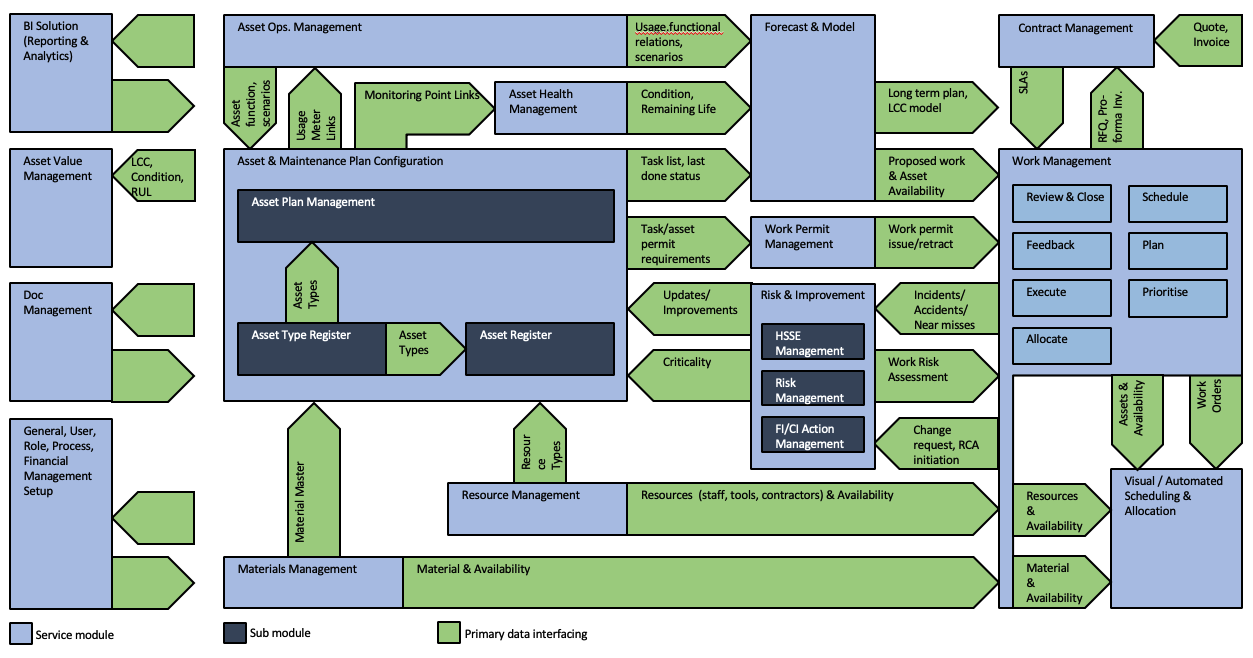
Context Diagram
The relationships between these different modules/service groupings can be visualised using the following context diagram: