User Defined Query Examples
Below are some examples of user defined queries created via the On Key user interface.
Example 1: Work orders with permission filter, not output ID
Setup
For this example, capture the following values on each of the tabs of the User Defined Query edit screen.
Overview
- Entity:
Work Order - Add Permission Filter: True
Query
- Query: SELECT wo.work_order_id, wo.code, wo.description, s.code AS site_code, wo.permission_tree_id FROM wm.work_order wo JOIN gen.site s ON wo.site_id = s.site_id WHERE wo.permission_tree_id = ANY(@permissionIds)
Parameters
Permission ID:
- Parameter Name:
@permissionIds - Inject Current User: False
- Primary Permission Parameter: True
Columns
Work order ID:
- Column name:
work_order_id - Primary Permission Column: False
- Output: False
Permission tree ID:
- Column name:
permission_tree_id - Primary Permission Column: True
- Output: False
Result

Example 2: Work orders with permission filter, specify columns
Setup
For this example, capture the following values on each of the tabs of the User Defined Query edit screen.
Overview
- Entity:
Work Order - Add Permission Filter: True
Query
- Query:
SELECT wo.work_order_id, wo.code, wo.description, s.code AS site_code, wo.permission_tree_id FROM wm.work_order wo JOIN gen.site s ON wo.site_id = s.site_id WHERE wo.permission_tree_id = ANY(@permissionIds)
Parameters
Permission ID:
- Parameter Name:
@permissionIds - Inject Current User: False
- Primary Permission Parameter: True
Columns
Work order ID:
- Column name:
work_order_id - Primary Permission Column: False
- Output: False
Code:
- Column name:
code - Property Name:
workOrderCode - Property Path:
WorkOrder->Code - Primary Permission Column: False
- Output: True
Description:
- Column name:
description - Property Name:
workOrderDescription - Property Path:
WorkOrder->Description - Primary Permission Column: False
- Output: True
Site code:
- Column name:
site_code - Property Name:
WOSiteCode - Property Path:
Site->Code - Primary Permission Column: False
- Output: True
Permission tree ID:
- Column name:
permission_tree_id - Primary Permission Column: True
- Output: False
Result

Example 3: Work orders with custom permission filter, work order user can edit
Setup
For this example, capture the following values on each of the tabs of the User Defined Query edit screen.
Overview
- Entity: None
- Add Permission Filter: False
Query
- Query:
WITH permission_tree_ids AS (SELECT DISTINCT unnest(psd.permission_tree_ids) AS permission_tree_id FROM uam.user_permission up JOIN uam.permission_set_data psd ON up.permission_set_id = psd.permission_set_id WHERE up.user_id = @userId AND up.permission_id = 30103) SELECT wo.work_order_id, wo.code, wo.description, s.code AS site_code, wo.created_on FROM wm.work_order wo JOIN gen.site s ON wo.site_id = s.site_id JOIN permission_tree_ids p ON wo.permission_tree_id = p.permission_tree_id
Parameters
User ID:
- Parameter Name:
@userId - Inject Current User: True
- Primary Permission Parameter: False
Columns
Work order ID:
- Column name:
work_order_id - Primary Permission Column: False
- Output: False
Code:
- Column name:
code - Property Name:
workOrderCode - Property Path:
WorkOrder->Code - Primary Permission Column: False
- Output: True
Description:
- Column name:
description - Property Name:
workOrderDescription - Property Path:
WorkOrder->Description - Primary Permission Column: False
- Output: True
Site code:
- Column name:
site_code - Property Name:
WOSiteCode - Property Path:
Site->Code - Primary Permission Column: False
- Output: True
Result
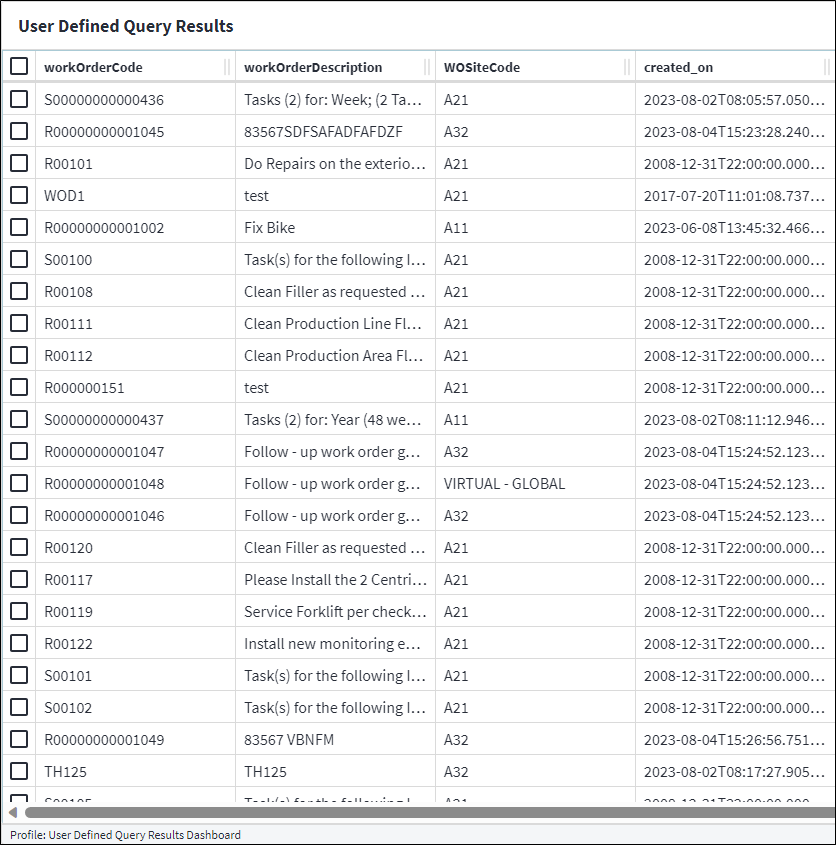
Example 4: Work orders with permission filter, custom filters
Setup
For this example, capture the following values on each of the tabs of the User Defined Query edit screen.
Overview
- Entity:
Work Order - Add Permission Filter: True
Query
- Query:
SELECT wo.work_order_id, wo.code, wo.description, s.code AS site_code, tow.code AS tow_code, wo.permission_tree_id FROM wm.work_order wo JOIN gen.site s ON wo.site_id = s.site_id JOIN ampc.type_of_work tow ON wo.type_of_work_id = tow.type_of_work_id WHERE wo.permission_tree_id = ANY(@permissionIds) AND tow.code = @tow AND s.code = @site
Parameters
Permission ID:
- Parameter Name:
@permissionIds - Inject Current User: False
- Primary Permission Parameter: True
Type of work:
- Parameter Name:
@tow - Inject Current User: False
- Primary Permission Parameter: False
Type of work:
- Parameter Name:
@site - Inject Current User: False
- Primary Permission Parameter: False
Columns
Work order ID:
- Column name:
work_order_id - Primary Permission Column: False
- Output: False
Code:
- Column name:
code - Property Name:
workOrderCode - Property Path:
WorkOrder->Code - Primary Permission Column: False
- Output: True
Description:
- Column name:
description - Property Name:
workOrderDescription - Property Path:
WorkOrder->Description - Primary Permission Column: False
- Output: True
Site code:
- Column name:
site_code - Property Name:
WOSiteCode - Property Path:
Site->Code - Primary Permission Column: False
- Output: True
Type of work code:
- Column name:
tow_code - Property Name:
WOTypeOfWorkCode - Property Path:
TypeOfWork->Code - Primary Permission Column: False
- Output: True
Permission tree ID:
- Column name:
permission_tree_id - Primary Permission Column: True
- Output: False
Result
The user is prompted to provide parameter values before the final result is displayed. Keep in mind that the parameter values need to be supplied in the correct data type format. In this example, the parameters are both of data type STRING, hence single quotation marks are used. Refer to On Key Query Language Expressions Data Types for more information.


Example 5: Work orders with custom permission filter for User and Permission
Setup
For this example, capture the following values on each of the tabs of the User Defined Query edit screen.
Overview
- Entity: None
- Add Permission Filter: False
Query
- Query:
WITH permission_tree_ids AS (SELECT DISTINCT unnest(psd.permission_tree_ids) AS permission_tree_id FROM uam.user_permission up JOIN uam.permission_set_data psd ON up.permission_set_id = psd.permission_set_id WHERE up.user_id = @userId AND up.permission_id = 30100) SELECT wo.work_order_id, wo.code, wo.description, s.code AS site_code, wo.created_on FROM wm.work_order wo JOIN gen.site s ON wo.site_id = s.site_id JOIN permission_tree_ids p ON wo.permission_tree_id = p.permission_tree_id
Parameters
User ID:
- Parameter Name:
@userId - Inject Current User: False
- Primary Permission Parameter: False
Columns
Work order ID:
- Column name:
work_order_id - Primary Permission Column: False
- Output: False
Code:
- Column name:
code - Property Name:
workOrderCode - Property Path:
WorkOrder->Code - Primary Permission Column: False
- Output: True
Description:
- Column name:
description - Property Name:
workOrderDescription - Property Path:
WorkOrder->Description - Primary Permission Column: False
- Output: True
Site code:
- Column name:
site_code - Property Name:
WOSiteCode - Property Path:
Site->Code - Primary Permission Column: False
- Output: True
Result
The user is prompted to provide parameter values before the final result is displayed. Keep in mind that the parameter values need to be supplied in the correct data type format. In this example, the user ID value is of data type LONG, hence an "L" is added after the value. Refer to On Key Query Language Expressions Data Types for more information.

